Selling Your Laptop Online? Here’s How to Verify a Buyer First
Published on
A decade ago, selling electronics meant visiting local stores or posting classified ads. Today, over 75% of used laptops are sold online, making it fast and easy to get cash in just a few clicks. But with convenience comes risk. Many sellers rush the process and skip basic checks; this is when scams, delayed payments, or unfair offers happen.
Not every buyer is honest. Some may offer a high price initially and drop it after inspection. Others may delay payment or stop responding once they have your device. These problems are surprisingly common in online resale markets.
The good news? You don’t need to be a tech expert to stay safe. By taking a few simple steps to verify the buyer, you can protect your laptop and get the best value—without stress.
1. Know Who You’re Selling To
What you want to know before taking up any offer is who the buyer is. Not every buyer functions in the same way.
Individual Buyers vs Professional Buyback Services
|
Individual Buyers |
Professional Buyback Services |
|
Consumers are typically located on social media or e-commerce sites. They also have frequent flash sales but lack much organization and security. |
Professional buyback services follow a clear, organized process. Typically, you receive an instant quote, ship your laptop using a prepaid label, and get paid after the device is inspected. |
|
For example, you may reach an agreement with a private buyer, only to find they are willing to renegotiate or even pay late, which can be frustrating and dangerous. |
For instance, CashForUsedLaptop ensures that each step is organized and predictable, providing sellers with a sense of safety and assurance. |
Why Established Companies Are Generally Safer
The reputation of established companies is their bread and butter. To remain in business, they require regular reviews and repeat customers. Owing to this, they are more prone to:
- Follow clear pricing rules
- Communicate during each step
- Pay within a defined timeframe
Here is an example of how one can establish a distinctly defined quote-ship-inspect-pay system in a company, which makes them easier to trust than a go-do-buy stranger requesting you to dispatch your laptop without a document.
And that does not imply that all companies are ideal, but organized services minimize uncertainty over individual transactions.
2. Check If the Buyer Is Legit
Once you know the type of buyer, the next step is to confirm whether they are real and free of scams.
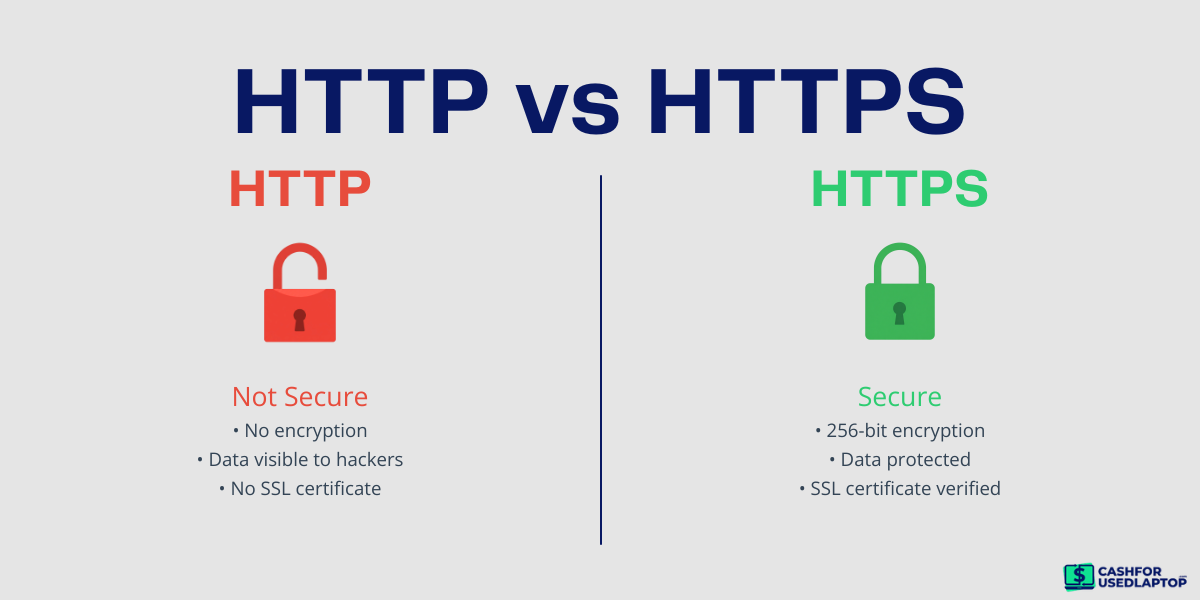
Start with the basics. Look at the website URL. A secure site will begin with “https” instead of “http.” This implies that your relationship is secure. This by itself does not mean that the buyer is a trustworthy character, but the lack of a secure connection is a definite red flag.
Then, verify whether the buyer provides appropriate business information. In a real company, one should be able to see:
- Business name
- Physical address
- Contact email or phone number
If this information is missing or hard to find, be careful. For example, having a site that is merely a contact form but contains no real contact information can be dangerous. Another activity you can engage in regarding the company name is checking online whether it appears on other websites.
Lastly, consider the clarity of the explanations of the process. You ought to readily know:
- How the price is decided
- What happens after you ship the laptop
- When will you receive payment
In case these steps are not clear or confusing, it is better not to deal with such a buyer. There is no way that a legitimate service will have anything complex or indirect to tell.
3. Look at Real Customer Feedback
Before you trust a buyer, check what other people are saying about them. Real reviews can give you a clear picture of what to expect.
Start with trusted platforms like Trustpilot, Sitejabber, or even Reddit. These are sites that tend to include real experiences by actual users. For example, when many individuals report being paid on time, it’s a good sign. In case you do not see any reviews at all, that is something to watch out for.
Do not just rely on star ratings. A company may receive a good rating, yet the specifications are more important. Read several reviews and find some patterns. Are individuals satisfied with the process? Do they talk about easy-going communication or affordable prices?
Note repetitive complaints also. When several users comment that their prices were dropped too much or that they were delayed in receiving payments, it is a good indication. It is common to have one negative comment, but with recurring problems, it is a sign that there is a real issue.
4. Understand the Offer Before You Agree
Before accepting any deal, make sure you understand exactly what you’re being offered. This will prevent future surprises.
The Instant Quote is given by most buyers based on your information. Nonetheless, they tend to verify your laptop and confirm the final price after inspections. For example, you may get a quote of $ 300 online, but when the device is inspected, the price may change. It is natural, but the terms have to be made obvious at the beginning.
While the condition of your device plays the biggest role in pricing, the timing of the sale can also influence the value. Demand often changes throughout the year, so checking current market prices before accepting an offer can help you make a better decision.
Note the way the value is evaluated. A trustworthy purchaser will clarify what influences the price, including:
- Physical condition (scratches, dents)
- Battery health
- Missing parts or accessories
This facilitates the comprehension of how a price can be varied. Buyers also consider current market demand. Laptops that fall among the most in-demand used devices often receive stronger offers because they’re easier to refurbish and resell.
In addition, do not accept ambiguous proposals. When you find unclear expressions, such as price may change with no explanation, be warned. Before you send your laptop, a good offer must be easy, clear, and easy to follow.
5. Confirm How and When You’ll Be Paid
Before you send your laptop, it’s important to know exactly how you’ll get paid.
- Payment methods: Typical methods are bank transfers, PayPal, or check. Select a method that you believe in and follow. PayPal and bank transfers are typically faster and more secure than checks.
- Payment timeline: A credible buyer will inform you of when payment is expected. They can also say, for example, "payment within 12 business days after inspection." In case no obvious timeline is offered, take it as a caution.
- Final offer options: In some cases, the offered price under inspection is not equal to the quote. Ensure that you are aware of the consequences in case of declining the last offer. Make sure that delivery is free, or you will be charged to send it back.
6. Review Shipping and Handling
Shipping does not involve payment, and you have to ensure that your laptop is securely handled.
- Prepaid shipping label: It is offered by most professional purchasers. This will include advance expenses and demonstrate that the company is coordinated.
- Tracking and insurance: You should always use a shipment with tracking to know your laptop’s location at any time. Insurance covers the loss or damage during transit.
- Handling during inspection: When the laptop is received, the buyer should handle it carefully and inspect it thoroughly. Although payment is not the theme here, effective communication on inspection would provide you with inner peace.
7. Protect Your Laptop Before Sending It
Before you ship your laptop, take a few simple steps to protect your personal data. Think of this as your checklist for selling a used laptop online. Many sellers forget this, but it’s just as important as verifying the buyer.
- Back up your data: Save important files, photos, and documents to cloud storage or an external drive. Once your laptop is gone, you won’t be able to recover anything from it.
- Reset the device: A full reset removes all personal data and restores the laptop to its original settings. This ensures the next user can’t access your information.
- Remove all accounts: Sign out of email, iCloud, Google, Microsoft, and any other accounts. Also, unlink the device from services like “Find My Device.”
In case you forget to remove your Apple ID or Google account, the next user may not be able to use the laptop, and your data could still be at risk.
8. Watch for Red Flags
You should not be sleepy even after conducting your research. There are warning signs that are easy to identify if you know what to look for.
- Too good to be true offer
When a buyer is willing to spend much more than the rest, it is likely to come with some strings attached. They can reduce the price in the future or possess a secret agenda.
- Poor communication
Delayed responses, irrelevant responses, or lack of replies are indicators of an untrustworthy buyer. A good buyer keeps you in the know at all times.
- Pressure to ship quickly
Do not fall into the trap of rushing to send your computer immediately when someone urges you to do so. Fraudsters usually seek to make hasty decisions so that you do not have time to ponder.
- Lack of transparency
If the process, pricing, or payment details are unclear, it’s better to walk away. A trustworthy buyer explains everything up front.
Notably, when a buyer resorts to evasion in response to straightforward questions about payment or price, it is high time to withdraw.
9. Choose a Buyer You Can Trust
After checking everything, the final step is making a confident choice. Instead of overthinking, focus on what you’ve already verified:
- The buyer has real business details
- Reviews are mostly positive
- The offer is clear and fair
- Payment terms are defined
If all these points check out, you’re likely dealing with a reliable service.
Businesses like CashForUsedLaptop follow a structured approach. They help sellers avoid confusion and unexpected issues.
At this stage, the goal is simple—choose the option that feels clear, predictable, and safe.
Conclusion
Verifying a buyer only takes a few minutes, but it can prevent major problems like scams, delayed payments, or unexpected price changes. By checking reviews, understanding the offer, and staying alert to red flags, you can sell your laptop confidently.
Using a trusted service like CashForUsedLaptop makes the process even easier. With clear quotes, prepaid shipping, professional inspection, and fast payment, you can sell your laptop safely and get the best value, without the stress or uncertainty of dealing with unknown buyers.