How Companies Sell Used Laptops Securely and Profitably

Every company has that pile of old laptops somewhere. Some are sitting in storage rooms, some are stacked in IT departments, and some have probably been forgotten in office cabinets for years. The funny thing is, many of those laptops still have real value. Businesses can recover a decent amount of money from them if they know how to sell them properly.
The problem is that old laptops are not just old pieces of hardware. They often still contain company emails, saved passwords, employee records, client files, and all kinds of sensitive information. That means businesses cannot just wipe the screen, hit “factory reset,” and send the device off to a buyer.
Selling used laptops has become a careful process of protecting data, fixing up devices, and finding the right resale channels without losing money along the way.
Why Companies Sell Old Laptops Instead of Keeping Them
Most businesses replace laptops every few years, even when the devices are still functional. Faster hardware, software compatibility, and cybersecurity upgrades all push companies toward regular refresh cycles. Once new devices arrive, the old ones usually end up sitting in storage unless the company has a proper resale plan in place.
That is where things start getting expensive. Unused laptops continue losing value every month while also creating inventory and security headaches for IT teams.
According to Gartner, global PC shipments reached more than 240 million units in recent years, which means businesses are constantly cycling huge amounts of hardware into secondary markets.
The Cost of Storing Unused Devices
Keeping old laptops around sounds harmless until companies realize how quickly outdated hardware loses resale value. Devices sitting untouched in storage rooms for two or three extra years are often worth far less than they would have been during the original upgrade cycle.
Storage also creates operational problems:
- IT teams still need to track those devices
- Old laptops can contain recoverable company data
- Inventory becomes harder to manage over time
- Aging batteries and components can fail in storage
Many businesses eventually realize they are losing money simply by delaying the resale process.
Why Businesses Replace Work Laptops Regularly
Most companies upgrade employee laptops every three to five years. In some industries, the replacement cycle is even shorter because software requirements evolve quickly.
Security is one of the biggest reasons behind these upgrades. Older systems may stop receiving firmware support, struggle with newer operating systems, or become harder to secure properly. Businesses also want employees working on machines that boot quickly, handle multitasking smoothly, and support modern collaboration tools.
The depreciation curve of laptops plays a major role here too. Devices lose value sharply once hardware generations become outdated. Companies that wait too long usually recover far less money during resale.
How Old Business Laptops Still Hold Resale Value
Even after corporate use, many devices still perform perfectly well for students, remote workers, startups, and smaller businesses. That is why there is strong demand for used business laptops in secondary markets.
Business-grade models are usually built with better cooling systems, stronger chassis materials, and longer lifespans than cheaper consumer laptops. Buyers know this, which is why refurbished enterprise devices continue selling steadily.
The refurbished electronics industry has also grown rapidly because more people now rely on refurbished tech instead of paying premium prices for brand-new hardware. According to IDC, the global refurbished device market continues expanding as both businesses and consumers look for lower-cost alternatives.
How Companies Decide Which Laptops Can Be Resold
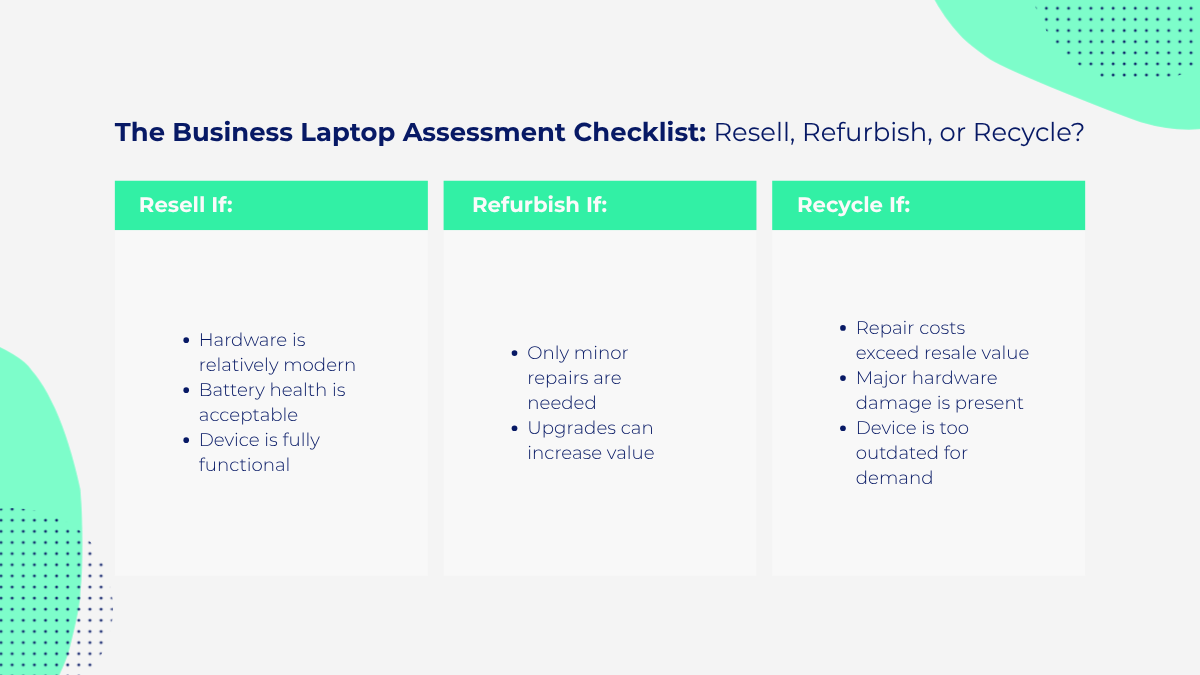
Not every old company laptop automatically goes back into the market. Before anything gets sold, businesses first evaluate which devices are worth refurbishing and which should be recycled instead.
This stage is important because repair costs can easily exceed resale value if the device is too damaged or outdated.
1. Checking the Age and Specifications of Devices
The first step is reviewing hardware specifications. Devices with modern processors, SSD storage, and healthy batteries usually have the best resale potential.
IT teams often check:
- Processor generation
- RAM capacity
- Storage type and health
- Battery performance
- Physical condition
Older laptops with slow processors or failing batteries may still work, but buyers usually expect major discounts for outdated hardware.
2. Separating Resellable Devices From Recyclable Ones
Some laptops are simply not worth fixing.
Machines with severe motherboard damage, cracked frames, failing displays, or major liquid damage often cost too much to repair. A heavily damaged or water-damaged laptop may become unreliable even after repair, which makes resale risky for businesses trying to protect their reputation.
In those situations, companies usually recycle the hardware responsibly or salvage usable components instead.
3. Identifying Devices That Need Refurbishment
Many laptops fall somewhere in between. They still work well but need small upgrades before buyers will pay competitive prices.
Common refurbishment steps include:
- Replacing weak batteries
- Installing new SSDs
- Repairing broken keyboards
- Cleaning cooling fans and vents
- Updating operating systems
Even simple cosmetic improvements can increase resale value noticeably.
Removing Company Data Before Selling Laptops
For most companies, data security matters far more than the actual laptop hardware. A single forgotten file can create legal, financial, or reputational problems long after the device leaves the company.
That is why businesses treat laptop resale as a security operation first and a sales process second.
Why Deleting Files Is Not Enough
A lot of people still believe deleting files or performing a factory reset completely removes data. It usually does not.
In many cases, deleted information remains recoverable unless the storage drive has been properly sanitized. That becomes dangerous when old work devices contain years of company activity.
Business laptops often store:
- Saved passwords
- Browser autofill data
- Internal reports
- Client documents
- Employee records
- Cloud service access tokens
According to the National Cybersecurity Alliance, improperly disposed devices continue to be a major source of preventable data exposure for organizations.
Backing Up Important Business Information
Before wiping anything, IT teams carefully review whether the laptop still contains files the company needs.
Archived projects, financial spreadsheets, employee information, or customer records sometimes remain stored locally for years. Businesses usually move this information into secure storage systems before beginning the wiping process.
Removing Employee Accounts and Company Access
Once backups are completed, the device is disconnected from the company environment completely.
That often includes:
- Removing employee profiles
- Signing out of Microsoft or Google accounts
- Revoking VPN access
- Removing management software
- Disconnecting cloud syncing services
This prevents old laptops from maintaining access to company systems after resale.
The Secure Data Wiping Methods Businesses Use
After company access is removed, businesses move on to permanent data sanitization. This is one of the most important parts of the entire process because a mistake here can turn an old laptop into a future security incident.
Most companies no longer rely on standard factory resets for business devices. Instead, they use professional erasure software designed specifically for secure device disposal.
These tools overwrite the storage drive so data cannot easily be recovered later. Many programs also generate verification reports confirming the wipe process completed successfully.
For businesses dealing with audits or compliance requirements, those records matter almost as much as the wipe itself.
Larger organizations often follow official frameworks like NIST 800-88 when disposing of old hardware. These guidelines explain how companies should sanitize storage devices before resale, recycling, or destruction.
Industries handling healthcare, finance, or legal records usually apply stricter disposal procedures because sensitive data carries much higher risk.
The National Institute of Standards and Technology provides one of the most widely used data sanitization frameworks in corporate IT environments.
Sometimes resale is not worth the risk.
Companies handling highly confidential information may physically destroy storage drives instead of wiping and reusing them. That can involve shredding, crushing, or dismantling the storage media completely.
For organizations dealing with government contracts, medical records, or sensitive legal information, eliminating recovery risk often matters more than resale profit.
How Companies Increase the Resale Value of Used Laptops
Once the security side is complete, the focus shifts toward maximizing resale value. Buyers expect refurbished laptops to look clean, run properly, and hold reasonable battery life.
Companies that prepare devices properly almost always recover more money than businesses trying to offload equipment quickly without testing or repairs.
1. Cleaning and Repairing Devices Before Resale
Presentation affects pricing immediately. A laptop covered in scratches, fingerprints, or missing keys instantly looks less trustworthy to buyers.
That is why companies usually clean devices professionally before resale. Small cosmetic repairs often include:
- Replacing damaged keys
- Cleaning displays and chassis
- Repairing loose hinges
- Replacing missing chargers
Minor improvements can significantly improve buyer confidence.
2. Replacing Batteries and Worn-Out Components
Battery condition plays a huge role in resale value because buyers notice poor battery life immediately.
In fact, laptop components age the fastest under constant office use, especially batteries and storage drives. Businesses often replace those parts because the increase in resale value usually outweighs the repair cost.
3. Testing Laptop Performance and Hardware Health
Before selling devices, companies normally run full hardware diagnostics.
Testing usually covers:
- SSD health
- RAM stability
- Battery performance
- Display quality
- Keyboard functionality
- Connectivity ports
A properly tested laptop is easier to sell and less likely to generate returns later.
Where Businesses Sell Their Used Laptops
After preparation and testing are complete, companies still need the right resale channel. The selling method often affects both profitability and operational convenience.
Selling Through IT Asset Disposition Companies
Large businesses usually work with IT asset disposition providers, also known as ITAD companies. These firms handle bulk pickup, secure wiping, refurbishment, and resale management.
This allows organizations to process hundreds or thousands of devices without managing individual sales internally.
Working With Refurbished Electronics Buyers
Some companies sell directly to refurbishers or wholesale electronics buyers instead. These businesses repair, grade, and resell laptops through secondary markets.
The global refurbishment industry keeps growing because electronic waste continues increasing worldwide. According to the Global E-waste Monitor, the world generated more than 62 million metric tons of electronic waste in 2022.
That growing waste problem is one reason refurbishment and reuse have become far more important in recent years.
Offering Laptops Through Employee Buyback Programs
Some organizations also allow employees to purchase their old work devices internally. Workers already know the condition and history of the laptops, which makes the process easier for both sides.
Businesses sometimes compare laptop trade-in vs cash for laptop options depending on whether they prioritize convenience or higher financial return.
At the same time, companies have become increasingly cautious about laptop trade-in scams involving fake buyers, undervalued offers, or poor handling of company data after collection.
What Affects the Resale Price of Business Laptops
Not all used laptops lose value at the same speed. Several factors directly influence how much businesses can recover during resale.
Device Age and Hardware Specifications
Modern processors, SSD storage, and higher memory configurations all improve resale demand. Older devices with weak hardware lose value quickly once performance expectations change.
Battery Health and Cosmetic Condition
Physical condition matters more than many businesses expect. Scratched screens, weak batteries, damaged hinges, and worn keyboards all reduce buyer confidence immediately.
Well-maintained devices almost always sell faster and for better prices.
Market Demand and Resale Timing
Timing can make a huge difference in profitability.
The best time to sell a laptop is usually before it starts feeling outdated inside the company itself. Once devices begin struggling with newer software or operating systems, resale demand often drops sharply too.
Companies that refresh hardware proactively usually recover much stronger returns than businesses that wait too long.
Common Mistakes Companies Make During Laptop Resale
Even businesses with structured IT departments sometimes make avoidable mistakes during the resale process. Those mistakes usually reduce profit, create security risks, or both.
Waiting Too Long to Sell Devices
One of the biggest mistakes is delaying resale for years after devices are replaced. Technology loses value quickly, especially once hardware generations become outdated.
Laptops sitting untouched in storage almost always become less profitable over time.
Selling Laptops Without Proper Testing
Skipping diagnostics may save time initially, but it often creates expensive problems later. Devices with hidden battery issues or failing storage drives lead to buyer complaints, returns, and damaged resale relationships.
Failing to Verify Secure Data Removal
Poor data sanitization is easily the most dangerous mistake in the entire process. One overlooked laptop containing sensitive information can create financial and legal problems far larger than the value of the device itself.
Summing Up
Selling old laptops has become far more complicated than simply clearing space in an office storage room. Businesses now treat the process as part of cybersecurity management, asset recovery, and long-term IT planning.
A successful resale strategy usually involves multiple stages: evaluating devices, removing sensitive data, refurbishing hardware, testing performance, and choosing the right resale channel. Companies that handle those steps carefully recover more value while reducing security risks at the same time.
The demand for refurbished laptops also continues growing as more buyers look for affordable alternatives to new hardware. That gives businesses a real opportunity to turn aging equipment into usable financial return instead of electronic waste.
Old laptops may no longer fit the company’s needs, but with the right process, they are still valuable to someone else. If you’re ready, sell your used devices at CashForUsedLaptop today.