A Practical Guide to Which Laptop Components Age the Fastest
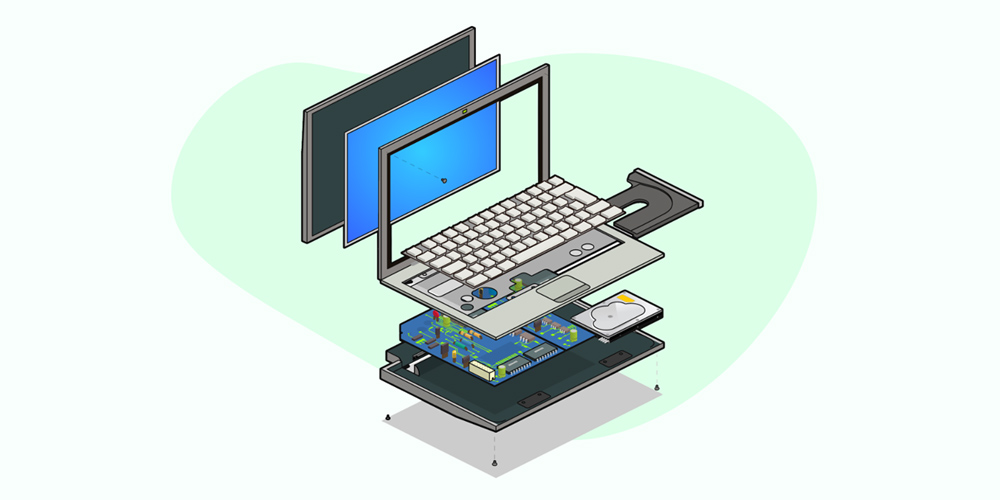
Image Source: iStockphoto/anilyanik
Do laptops “die” all at once? Well, not really. They wear down piece by piece, and most of the time it is not obvious until things start feeling slower, hotter, or less reliable than before. One day it boots fine, a few years later it struggles with the same tasks it once handled easily.
What usually surprises people is that not all parts age at the same speed. Some components stay solid for years, while others quietly lose performance in the background. The battery is often the first to go, storage can start dragging things down, and even cooling systems begin to struggle with dust and heat over time.
In this article, we will look at which laptop parts tend to age the fastest and why. Once you understand that, it becomes much easier to decide whether a laptop needs a fix, a replacement part, or just a bit of maintenance.
Why a Laptop Starts Feeling Slow in the First Place
Most laptops do not become slow because one part suddenly gives up. It is usually a gradual process in which small changes add up over time. The hardware is still functioning, but the overall experience starts to feel heavier, less responsive, and sometimes unpredictable.
• Software Builds Over Time
As months and years pass, most users naturally install more applications, browser extensions, and background tools. On top of that, operating systems keep updating in ways that are designed for newer machines. The result is extra background activity that the original setup was never really built to handle.
This is one of the key reasons behind the depreciation curve of laptop brands, where performance feels steady at first, then slowly drops as software demands increase. Even simple tasks like opening a browser or switching between apps can start taking longer, not because the laptop is broken, but because it is doing more work than before.
• Storage Gets Slower and Fuller
Storage plays a bigger role in performance than most people realize. When a drive gets close to full, the system has less room to manage temporary files and background processes efficiently. On older hard drives, this effect is even more noticeable because mechanical movement becomes less efficient over time. Even SSDs, while faster, can lose some responsiveness when heavily used or nearly filled.
Over time, this directly influences laptop longevity, as slower storage often creates the first clear “this feels old” moment for users, even if the rest of the hardware is still fine.
• Battery Health Affects Performance
The battery is usually the first component to show visible aging. As charge cycles increase, it holds less capacity and delivers power less consistently. Many laptops also adjust performance to protect weak batteries, which can lead to reduced speed under load. This means a laptop plugged into power may still not perform at its original level if the battery has degraded significantly.
In practical use, this shows up as sudden drops in performance, shorter usage time, and occasional shutdowns even when the battery percentage is not fully empty.
• Heavier Apps and Updates Over Time
Software does not stay static. Every few updates, applications become more feature-rich, but also more demanding. Operating systems follow the same pattern, gradually requiring more memory, faster storage, and better graphics performance.
A laptop that once handled everything smoothly can start struggling simply because modern software expectations have changed. This shift does not happen overnight, but slowly builds pressure on all components at once, making the system feel older than it technically is.\
Breaking Down the Parts That Wear Out First
Once performance starts slipping, the real question is not just why, but where. Laptops age unevenly. Some components take constant strain and wear out early, while others stay reliable for years but slowly fall behind. Knowing the difference helps you decide whether a quick fix is enough or if it is truly time to let go of a laptop.
1. Battery (The First and Most Noticeable Decline)

The battery is almost always the first component to show clear signs of aging. Most modern laptops use lithium-ion batteries, which are designed to handle a limited number of charge cycles, typically around 300 to 500, before noticeable decline begins. Over time, the battery loses its ability to hold a charge and deliver consistent power, even if the laptop itself is in good condition.
What makes this tricky is that battery wear is gradual. You might not notice it at first, but eventually the drop becomes hard to ignore. Performance can also take a hit, as many systems reduce power output when the battery health declines.
-
Shorter battery life even after a full charge
-
Sudden percentage drops or inaccurate readings
-
Unexpected shutdowns under load
-
Heat buildup during charging
For many users, battery degradation is the first real sign that a laptop is no longer as reliable as it once was.
2. Storage Drive (Where Performance Starts to Slip)

Storage plays a direct role in how fast a laptop feels, which is why its aging becomes noticeable early. Traditional hard drives rely on spinning disks and mechanical arms, which naturally wear down over time. Solid-state drives, while faster and more durable, are not immune either. They rely on memory cells that degrade after repeated write cycles.
As storage ages, the system begins to slow in ways that feel frustrating but are often misunderstood. Boot times increase, applications take longer to load, and file transfers feel less responsive. According to industry estimates, SSDs can handle hundreds of terabytes of writes, but heavy daily use can still degrade their performance over time.
-
Slower boot and shutdown times
-
Delays when opening or saving files
-
Occasional data errors or corrupted files
-
Reduced responsiveness when storage is nearly full
Replacing or upgrading storage is often one of the most effective ways to improve performance and extend your laptop’s lifespan without replacing the entire system.
3. Cooling System (The Quiet Cause Behind Performance Drops)

Cooling systems rarely get attention until something goes wrong, but they play a central role in how a laptop ages. Over time, dust builds up inside the vents and fans, restricting airflow. At the same time, thermal paste, which helps transfer heat away from the processor, begins to dry out and lose effectiveness.
As cooling efficiency drops, internal temperatures rise. Modern laptops are designed to protect themselves by reducing performance when they get too hot, a process known as thermal throttling. This creates a situation where the laptop still works, but never quite feels as fast as it used to.
-
Louder or constantly running fans
-
Noticeable heat during normal tasks
-
Sudden drops in performance under load
-
Increased strain on internal components
Poor cooling does not just affect speed. It accelerates wear across other parts, making it a hidden factor in overall system aging.
4. RAM (More About Limits Than Lifespan)

RAM does not usually wear out in the traditional sense. It is one of the more stable components in a laptop. However, it can still become a problem as software demands grow. Applications today use far more memory than they did a few years ago, especially browsers, design tools, and multitasking environments.
As a result, laptops with limited RAM begin to struggle, even if the memory itself is functioning perfectly. The system starts relying more on storage as temporary memory, which is much slower and leads to noticeable lag.
-
Slow multitasking and app switching
-
Frequent freezing when multiple tabs or apps are open
-
Increased reliance on virtual memory
-
Delays in loading heavy applications
In many cases, upgrading RAM can restore responsiveness, but in older systems, this is not always possible due to hardware limitations.
5. CPU and GPU (Built to Last, But Not to Keep Up Forever)

Processors are designed for long-term use and rarely fail under normal conditions. However, they age in a different way. Instead of wearing out, they become less capable compared to modern software demands. What once felt fast can start to feel limiting as applications evolve.
Heat also plays a role here. Years of exposure to high temperatures can affect efficiency, especially if cooling has not been maintained properly. While the CPU and GPU may still function correctly, they may not deliver the same level of performance they once did.
-
Slower performance with newer software updates
-
Difficulty handling demanding tasks like editing or gaming
-
Reduced efficiency under sustained workloads
-
Increased dependence on cooling performance
These components are often the reason users feel their laptop is outdated, even when nothing has technically failed.
6. Display (Subtle Changes That Add Up Over Time)

Displays age more quietly than other components, but the changes become noticeable over time. Brightness levels can drop, colors may lose accuracy, and in some cases, uneven lighting begins to appear. The type of display also plays a role in how it ages.
For example, OLED panels offer deeper contrast but can be more prone to burn-in under certain conditions, while LED displays tend to degrade more evenly over time. The OLED vs LED screens comparison often comes down to how each handles long-term use rather than just visual quality at the start.
-
Reduced brightness compared to original levels
-
Slight color shifts or fading
-
Risk of burn-in in static image areas (OLED)
-
Backlight dimming in LED panels
While displays rarely fail completely, their gradual decline affects how the laptop feels in everyday use.
7. Keyboard, Trackpad, and Hinges (Wear You Can Physically Feel)
These are the parts you interact with the most, so physical wear is unavoidable. Over time, keys may lose their responsiveness or become uneven. Trackpads can develop sensitivity issues, and hinges may loosen or stiffen depending on usage habits.
Unlike internal components, this type of wear is immediately noticeable because it affects how the laptop feels to use. Even if performance is still acceptable, physical degradation can make the device frustrating to handle.
-
Worn or unresponsive keys
-
Trackpad lag or inconsistent clicks
-
Loose or creaky hinges
-
Visible signs of wear on surfaces
At this stage, the issue is less about performance and more about usability, which often plays a big role in deciding whether to keep or replace a laptop.
Quick Comparison of How Laptop Components Age
This quick comparison helps put everything side by side so you can see which components tend to fail first, which ones can be replaced, and how each one impacts overall performance. It is a simple way to understand where problems usually start and what to watch out for before things get worse.
|
Component |
How Fast It Ages |
Impact on Performance |
Replaceable |
Key Signs of Wear |
|
Battery |
Fast |
High |
Yes |
Short runtime, shutdowns |
|
Storage (HDD/SSD) |
Medium–Fast |
High |
Yes |
Slow boot, lag, file delays |
|
Cooling System |
Medium |
High (indirect) |
Yes |
Overheating, loud fans |
|
RAM |
Slow |
Medium |
Yes |
Multitasking lag |
|
CPU / GPU |
Very Slow |
High (long-term) |
No |
Performance drop vs new apps |
|
Display |
Slow |
Medium |
Yes |
Fading brightness, color shift |
|
Keyboard/Trackpad |
Medium |
Low–Medium |
Yes |
Unresponsive keys, wear |
Final Thoughts
Laptops rarely fail all at once. It is usually a slow build-up, where the battery weakens, storage slows down, and cooling struggles to keep up. Some parts can be replaced and give the device a second life, while others signal that it has reached its natural limit. Knowing which components age the fastest helps you make a clearer call, whether that means upgrading a part or moving on entirely.
If your device is already showing multiple signs of wear and you are ready to move on, sell your old laptop at CashForUsedLaptop.